Today, we use fifth generation computers with AI and ULSI technology. They are fast, smart, and helpful in daily life. But the first generation computer was very different. First generation computers were huge in size, expensive, slow, and used vacuum tubes. They were mainly using for basic calculations in early scientific research work fields.
First-generation computers were very large and lived in an entire room. They must be only performing simple arithmetic and calculation work. These computers are design in the 1940s that are use very limited. Unlike today, computers were not common at that time. But, now they have grown an important part of our daily life.
With new technology, early computers slowly changed into advanced and smart machines. Today, we use the intelligent systems in our daily life. Here are the few example work, study, communication, entertainment, and many other important tasks every day.
In this blog, we explore the start of computer technology, called the first generation of computers. We will guide you around their origin, basic structure, and how early computer systems worked.
What are First Generation of Computers?
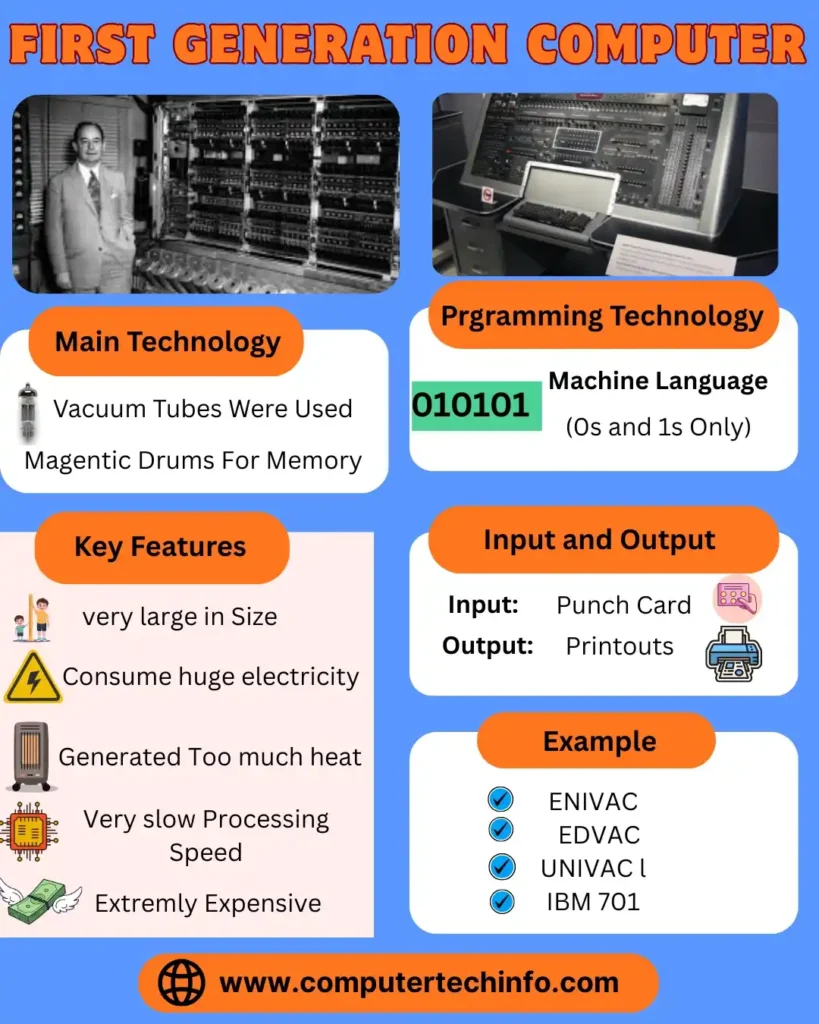
First-generation computers produced a lot of heat and often damaged.
Due to excessive heat, electronic parts used to burn easily.
Also Read: Second Generation of Computer and its Examples, Characteristics, & History
These computers consumed very high electricity and power.
They worked only on low level languages like machine language and assembly language.
They must be performing only one task at a time.
Vacuum tubes were using in first generation computers.
As you know, vacuum tube was a fragile glass device that runs electronic signals using electrons.
Here, we are going to discuss about first electronic computer, ENIAC, its design by J. Presper Eckert and John W. Mauchly at the University of Pennsylvania.
Now, let start the ENIAC is very big around 50 meters long. It is weight around 40 tons, and used around 19,000 vacuum tubes.
Magnetic drums and punch cards used like data storage.
These machines generated too much heat, so air conditioners were needed to save is cool.
Because of their big size, that need big space and it’s very difficult to move.
What are Vacuum Tubes?
Now, we explore the Vacuum tubes that are electronic devices; control the flow of electrons in an empty glass tube. They were using to manage electrical current and increase signal power. But, these tubes consumed a lot of electricity and generated too much heat. In which many time problems were creating in early computers.
First Generation of Computer Examples with Name
Here are few examples of first-generation computers.
Now, let us knows each example in simple detail one by one:
1) ENIAC (Electronic Numerical Integrator and Computer)
Let we discuss the first general-purpose electronic computer. It is design in 1945 by John Mauchly and J. Presper Eckert. They developed at the University of Pennsylvania for the U.S. Army.
ENIAC was so big that it protects a full house and weight around 30 tons. The almost around 18,000 vacuum tubes, 70,000 resistors, and 10,000 capacitors.
ENIAC marked the start of electronic computing and proved that machines must be solving problems much faster than humans.
It mainly used for military calculations during World War II.
Features:
- It works in vacuum tube technology.
- It works perform around 5,000 adding in one second.
- Use punch cards to give input and give output.
- A need is big cooling system to stay safe from heat.
- That consumes around 150 kilowatts of electricity.
- Does not have internal memory like modern computers.
- It Programs set manually are using switches and wires.
2) UNIVAC I (Universal Automatic Computer I)
Let’s discuss next one; the UNIVAC I the first commercial computer. This developed in 1951 by Eckert and Mauchly. It was mainly using by businesses and government offices like data processing.
It was smaller and more practical linked to ENIAC and suitable like real life work.
UNIVAC I grew popular after correctly see the 1952 U.S. Presidential Election results.
It was using like commercial and administrative tasks.
Features of UNIVAC I:
- It used vacuum tubes like processing data.
- Magnetic tape used like data input and storage.
- It must be process both numbers and text.
- It was faster and more reliable than already computers.
- It must be store up to 1,000 words of data.
- Due to high heat generation, air conditioning was needs.
3) IBM 701
IBM 701 was design in 1952 by International Business Machines (IBM). It was IBM’s first scientific computer, mainly designed like defense and scientific research.
It helped solve complex mathematical problems like the U.S. government and research organizations.
IBM 701 was using such as scientific studies, defense work, and research calculations, including atomic energy projects.
This computer marked IBM’s entry into the computer industry and became the foundation for future IBM systems.
Features of IBM 701:
- It used vacuum tube circuits such as processing and logic.
- It must be perform around 16,000 additions per second.
- Electrostatic storage tubes used like memory.
- It supported machine language programming.
- Punch cards used like as input and printers like output.
- It designed to work continuously for long hours.
4) IBM 650
Now, let us the explore IBM 650 they are design in 1953 and grow are one of the most popular first-generation computers. But, it was smaller and cheaper than other systems.
It was widely using by universities, businesses, and engineering companies.
IBM 650 mainly used like education, business calculations, and scientific research.
It helped students learn programming and basic computer logic.
Because of this, IBM 650 grown a popular teaching computer and trained many future computer scientists.
Features of IBM 650:
- It used vacuum tubes along with magnetic drum memory.
- It must be store up to 2,000 words of data.
- Punch cards used to read and write information.
- Its design was more compact and needs less cooling and maintenance compared to before computers.
5) EDVAC (Electronic Discrete Variable Automatic Computer)
Let we talk the EDVAC it was design in 1949 by Eckert and Mauchly. It introduced the stored program concept designed by John von Neumann.
This concept allowed both data and instructions to be storing in memory that making the computer faster and easier to reprogram.
EDVAC was mainly using like scientific research and testing computer programs.
It helped researchers knows and improve the stored program idea.
EDVAC later grew the base model like modern computer architecture.
Features of EDVAC:
- It used vacuum tubes are processing.
- It worked on binary numbers (0 and 1) first of decimal numbers.
- It had internal memory to store data and instructions.
- This is more effective in ENIAC, small in size, and reduced less power.
6) EDSAC (Electronic Delay Storage Automatic Calculator)
Here, we are discussing EDSAC at the University of Cambridge by Maurice Wilkes EDSAC this design in 1949. It was the first computer to store programs electronically and helped scientists with complex calculations like research and education.
Also Read: Third Generation of Computer and its Examples, Features, Characteristics, & Uses
It was mainly using such as scientific and academic research.
EDSAC helped solve mathematical and logical problems easily.
It introduced the idea of automatic computing and helps early university research work.
Features of EDSAC:
- It used mercury delay lines like memory storage.
- It worked using vacuum tube technology.
- It must be store and run multiple instructions.
- The output results were printed using a teleprinter.
- It was smaller and more efficient than ENIAC and EDVAC.
7) LEO I (Lyons Electronic Office)
Another one, the LEO I (Lyons Electronic Office) was design in 1951 by J. Lyons & Co., a British food company. It was based on the EDSAC design and grown the first computer builds like commercial business use.
LEO I mainly used are business work such as salary processing, sales reports, and financial calculations.
It helped companies control office tasks more easily and accurately.
LEO I became a pioneer in business computing and showed how computers must be improves office operations.
Features of LEO I:
- It used vacuum tubes and magnetic drum storage.
- It handled big amounts of business data and records.
- It performed calculations such as payroll, sales, and inventory management.
- It worked much faster than text accounting systems.
8) MANIAC (Mathematical Analyzer, Numerical Integrator, and Computer)
Let us discus MANIAC at the Los Alamos Scientific Laboratory it developed in 1952. It was mainly using like nuclear energy and advanced mathematical research. It was based on the IAS computer design.
MANIAC used for as scientific research, especially for nuclear studies and complex calculations.
It played an important role in scientific development during the early days of computers.
Features of MANIAC:
- It used vacuum tubes such as logic and processing.
- It helps the stored program concept.
- It offered high speed processing like difficult mathematical problems.
- It used to perform scientific simulations such as atomic and nuclear research.
9) IAS Computer (Institute for Advanced Study Computer)
Now, let us discuss the IAS Computer was design in 1952 under the guidance of John von Neumann at the Institute for Advanced Study, Princeton. Its design later inspired many computers like MANIAC and ORDVAC.
It mainly built for scientific and engineering research.
The IAS Computer helped in developing new computing ideas and mathematical models.
It became the foundation now most modern computer architectures.
Features of IAS Computer:
- It used vacuum tube circuits for processing.
- It followed the stored program concept.
- It must be store both data and instructions in the same memory.
- It performed arithmetic operations at high speed and was more compact than ENIAC.
10) Harvard Mark I
Here, we are going to discuss about Harvard Mark I that designed in 1944 by Howard Aiken at Harvard University. It was a large electromechanical computer that used both mechanical switches and electrical parts. It was mainly using during World War II for scientific and mathematical calculations.
The U.S. Navy used Harvard Mark I to prepare long mathematical tables and perform military calculations.
Features of Harvard Mark I:
- It worked using mechanical relays and switches.
- Paper tape used such as input and output operations.
- It must be perform calculations automatically in sequence.
- It was slower as compared to fully electronic computers.
- It was create using more than 750,000 components.
Technology Used In The First Generation Of Computer
- These computers mainly worked using vacuum tube technology.
- They help only machine language such as programming.
- They operated on batch processing operating systems.
- Punch cards were used to enter data as input.
- Magnetic tapes were used like storing data.
- Paper tapes were used such as output, and results were available only as printed copies.
First Generation Of Computer Advantages And Disadvantages
In this section, our team will educate about various benefits and drawbacks | advantages & disadvantages of first generation computer, like as:
Advantages of First Generation Computer
Here, we discuss the First-generation computers are few important benefits.
Also Read: Fourth Generation of Computer and its Examples, Features, Benefits, & Technology
- They must be performing calculations very fast, within milliseconds.
- These computers used vacuum tubes as their main electronic component. That is the best technology available at that time.
- They were mainly designed for scientific work.
- Since they used machine language, their processing speed was comparatively fast.
- First-generation computers were also used like complex calculations in the development of atomic bombs.
Disadvantages of First Generation Computer
Now, let us discuss the First-generation computers are many limitations.
- These computers were very expensive to build and maintain.
- Their size was extremely big and needs an entire room to save them.
- Because of their huge size, they were very heavy and difficult to move.
- They consumed a lot of electricity and produced excessive heat.
- Since vacuum tubes were used, big cooling systems were required.
- Their storage capacity was very limited, so they must be store only a small amount of data.
- These computers were not very reliable and were also difficult to operate.
Characteristics of First Generation of Computer
- Use of vacuum tubes to make circuits
- Use of magnetic drums
- Use of machine language and symbols in instructions
- Very small amount of storage space
- Use of punch cards as I/O devices
- Huge in size and poor in mobility
- Very slow and less reliable output
- Use of high electricity
- Generates too much heats
- Complex and expensive to maintain
Uses Of First Generations Of Computer
- As you know, First-generation computers were mainly used during the 1940s.
- They were used like business data processing work.
- These computers helped in accounting tasks.
- They were used like sorting and merging files using multiple magnetic tape drives as external storage.
- During World War II, first-generation computers were used to break German secret codes.
- Since they were difficult to use, only trained professionals and military personnel operated them.
- These computers were also used such as commercial and business purposes.
FAQs (Frequently Asked Questions)
Who Invented The First Generation Of Computer?
Now, we are discuss the First-generation computers they designed by John Presper Eckert and John Mauchly. It is created ENIAC, it was the world’s first electronic general purpose computer.
What Period Is Called The First Generation Of Computers?
It was used around 1940 to 1956.
Which Technology Was Used In First Generation Of Computer?
The First-generation computers used vacuum tubes. Here are few example its technology was used circuits and magnetic drums for memory, making them big, expensive, and using a lot of electricity.
Which Language Was Used In First-Generation Computers?
They were programmed using only machine language.
Verdict Up
But, first-generation computers had many disadvantages. Here we started the computer revolution. They paved the way for second-generation computers and eventually the modern devices we use today.
Also Read: Fifth Generation of Computers and its Examples, Features, and Benefits
Knowing their history helps us knows how technology has built our work easier and faster in this digital era.