
Let us discuss the Reverse Address Resolution Protocol (RARP) is an older network protocol that allows a device to discover. Its IP address if it knows it’s hardware (MAC) address. It was mostly using by diskless computers during startup. The device sends a RARP request over the network and a RARP server replies with the correct IP address.

It is know RARP became outdated because it could only assign IP addresses. Protocols like BOOTP and DHCP replaced it giving complete network configuration automatically.
In this article we have study the Reverse Address Resolution Protocol in simple terms. It includes its working, components, features and benefits.
What is Reverse Address Resolution Protocol (RARP)?
Let us discuss about the Reverse Address Resolution Protocol(RARP)?This is a network protocol that allows a computer to decide its IP address alike its MAC address.
This is the reverse of ARP which finds a devices MAC address from its IP address. It was mostly using by diskless office to get an IP from a network server. It is outdated and has been replaced by BOOTP and DHCP.
History and Development
Lets define RARP created in the early 1980s to help diskless workstations get IP addresses. It played an important role in the development of network protocols. It covered the way for more advanced technologies.
Also Read: Twisted Pair Cable and its Types, Examples, & Applications
As time passes RARP was mostly replacing by more efficient protocols such as BOOTP and DHCP. These newer protocols give additional features and more flexibility. Its making them better suited for modern networks.
Purpose of Reverse Address Resolution Protocol
The main purpose of Reverse Address Resolution Protocol is to assign IP addresses to devices that don’t have storage to save them. This added workstations, embedded systems, network printers, routers and switches.
It is commonly known that RARP allows these devices to automatically get an IP address from a RARP server. The server keeps a table that matches each MAC address to an IP address. The device receives its IP it can use it to communicate with other devices on the network or access network resources.
Everyone knows that RARP also helps safe IP address clashes. By assigning a different IP address to each MAC address. The RARP server confirms that no two devices use the same IP. Its avoiding communication errors and network breakdowns.
How does Reverse Address Resolution Protocol work?
The functioning of RARP can be summarized as follows:
Also Read: Hardware Components of Computer Network
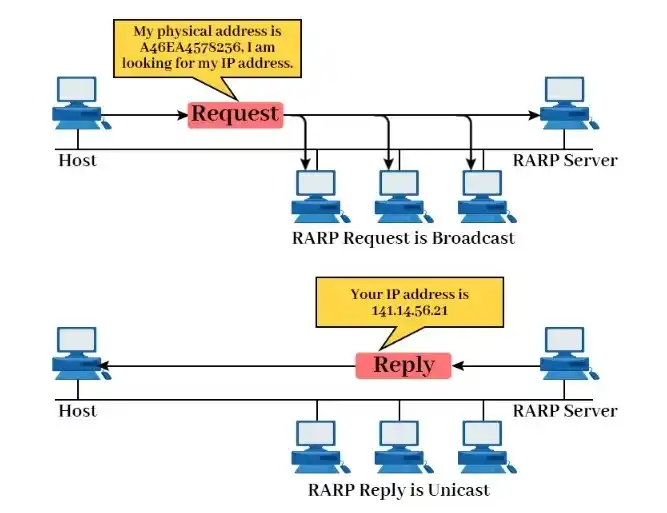
When a device needs an IP address it sends a RARP request packet that adds its MAC address in both the sender and receiver hardware fields.
As we understand a special RARP server on the network reads the request packet and searches its table to find the IP address that matches the devices MAC address.
When a matching MAC address is found in the RARP server’s table. The server sends a RARP reply packet adding both the MAC address and the corresponding IP address.
It is know the device that sent the RARP request receives the reply from the server. It removes the IP address from the reply and uses it to communicate on the network.
Components of RARP
The Reverse Address Resolution Protocol involves four important components: a client device without local storage, a RARP server with a MAC to IP mapping table, broadcast-based communication and the clients network interface identified by its MAC address.
1. RARP Client
A RARP client is usually a diskless device or a computer without a locally stored IP address. On startup it broadcasts a request to obtain its IP address using its MAC address.
2. RARP Server
Let’s talk the RARP server monitors the local network for requests. It keeps a table that links MAC addresses to IP addresses and replies to the client with the correct IP if a match exists.
3. Mapping Table (MAC-to-IP Table)
It is know the RARP server maintains a static mapping table that associates each known MAC address with a corresponding IP address. This table needs manual configuration and updates by the network administrator.
4. Broadcast Communication
As we know the RARP client broadcasts a request because it doesn’t know its IP or the servers. Only the RARP server answers though all devices receive the frame.
5. Network Interface (MAC Address)
It is know that the Mac address is the hardware address of the clients network interface. Its differently identifies the device on the local area. It is using by the RARP server to assign the correct IP address.
Use Cases and Applications
Let’s define the RARP client broadcasts a request because it doesn’t know its IP or the servers. The RARP server answers though all devices receive the frame.
Also Read: Peer to Peer Network Architecture and its Types and Examples
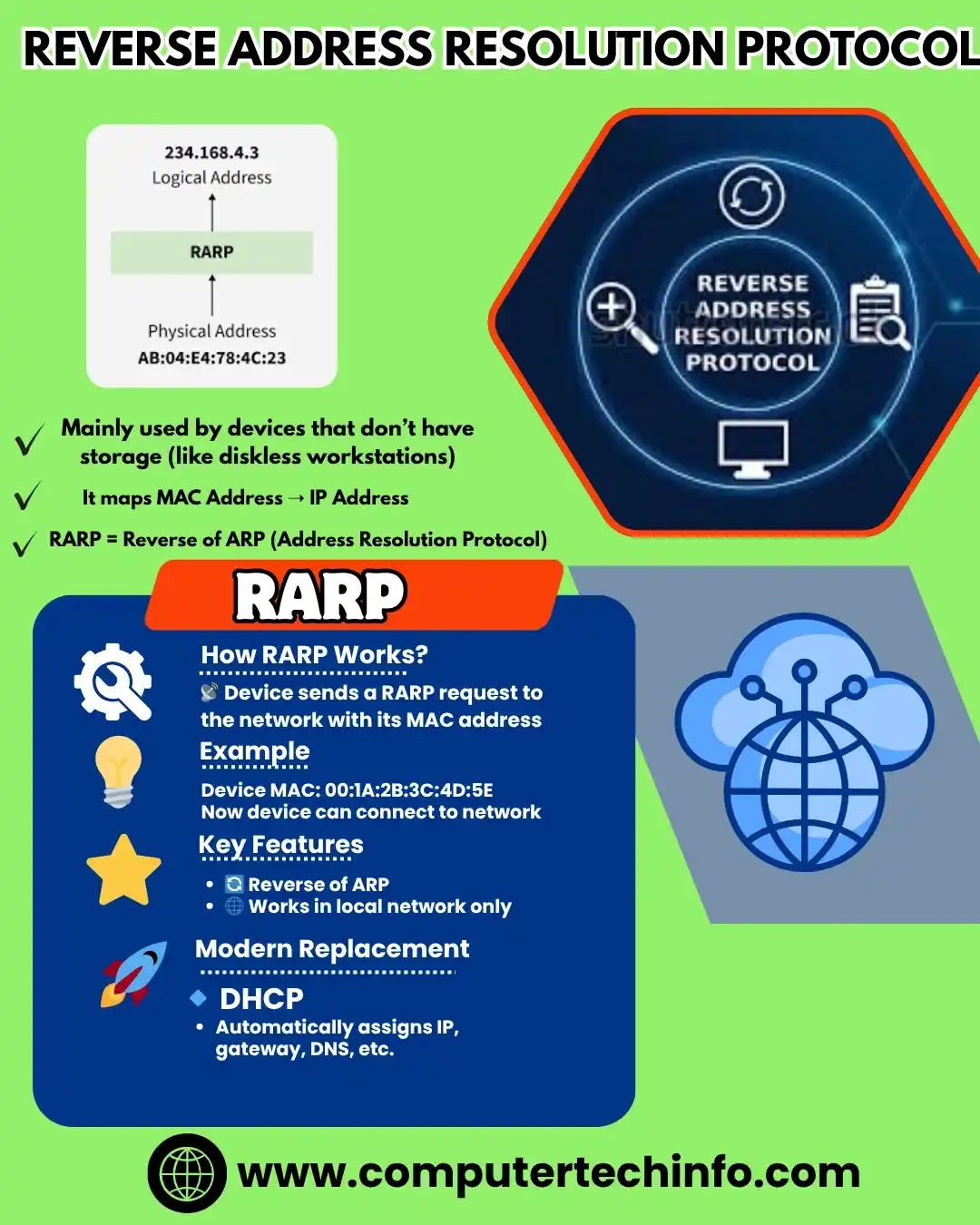
As we know other applications of RARP is in network management for telecom companies. Its helps in mapping physical machine addresses to IP addresses. Its supporting efficient network operations and troubleshooting.
How Is RARP Different From ARP?
It is know that the while RARP maps a known MAC address to its corresponding IP the Address Resolution Protocol (ARP) performs the reverse function. When a device knows the logical IP but not the physical MAC address.
It issues an ARP request to determine the MAC. This enables efficient unicast communication instead of broadcast. ARP tables and lookups are standard operations on network routers and Layer 3 switches.
Advantages of RARP Protocol
Some advantages of utilizing RARP include:
Its makes it easier to configure and manage devices that don’t have storage or files to save their IP addresses.
It minimizing expenses and complexity by removing the need to manually assign unique IP addresses to each device.
Its avoiding address clashes by securing each MAC address is assigned a different IP address by the RARP server.
Its giving functionality for old hardware that cannot use new protocols like DHCP or BOOTP.
Disadvantages of RARP Protocol
In addition to its benefits, RARP has a few limitations. These are:
Also Read: What is Hub in Network? Types and Its Working
It needs a RARP server on each network segment. which increases both cost and maintenance expenses for network infrastructure.
The use of broadcast messages in RARP may consume bandwidth and contribute to network blockage.
It is know there are no mechanisms in RARP to authenticate or validate devices during IP address assignment.
RARP is limited in functionality and cannot deliver supplementary settings like subnet masks, gateways, DNS information or lease periods unlike DHCP and BOOTP.
Is RARP Obsolete?
As we know the RARP is now outdated and is rarely used in modern networks due to its limitations. It has largely been replaced by:
BOOTP (Bootstrap Protocol): Its provides IP along with gateway, DNS and configuration.
DHCP (Dynamic Host Configuration Protocol): As we know an advanced version of BOOTP used today for dynamic IP allocation and complete network configuration support.
FAQs (Frequently Asked Questions)
Final Words
In conclusion, early network environments RARP played a important role by allowing devices to determine their IP addresses from their MAC addresses.
Also Read: What is Wireless Ad Hoc Network? Types, Examples, Uses, and Pros/Cons
As we understanding RARP though outdated. Its gives valuable context for how network protocols evolved and how devices originally obtained IP addresses.
If this article is valuable for you, then please share it along with your friends, family members, pet lovers or relatives over social media platforms like as Facebook, Instagram, Linked In, Twitter, and more.
Do you have any experience, tips, tricks, or query regarding on this? You can drop a comment!
Have a Nice Day!


