
Hello Friends! Today, here we will let discuss about what is process in OS with their terminology in detail; involving with different types of process in operating system with ease.
This is unique article over the internet about Process in Operating System and its Types.
What is Process in Operating System?
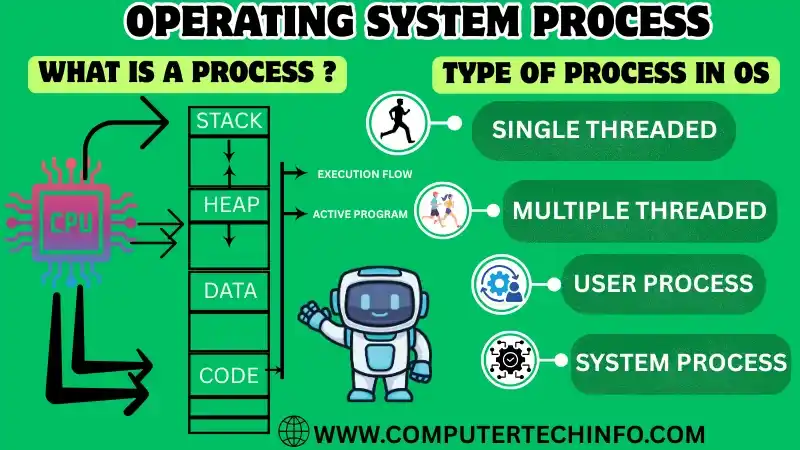
Process refers to an executing program or a collection of related tasks that treat as a unit of work. When a program is run, the operating system creates a process to manage it. The process contains all the necessary information and resources required to execute the program. This includes such as the program code, memory space, data, open files, and other system resources.
Also Read: Multiprogramming Operating System and its Examples, Types, & Advantage
Processes allow managing with operating system’s kernel, which is responsible for allocating resources, scheduling tasks, and managing inter-process communication. Each process has its own virtual memory space, which isolate from other processes.
That allows processes to operate alone and stop them from interfering with each other. The OS scheduler determines which process must beexecuted next, based on part such as priority and CPU utilization.
As we know the processes can communicate with each other using inter process communication. These mechanisms will provide by the operating system, such as pipes, shared memory, and message queues. This allows processes to exchange data and coordinate their actions.
Components of Process
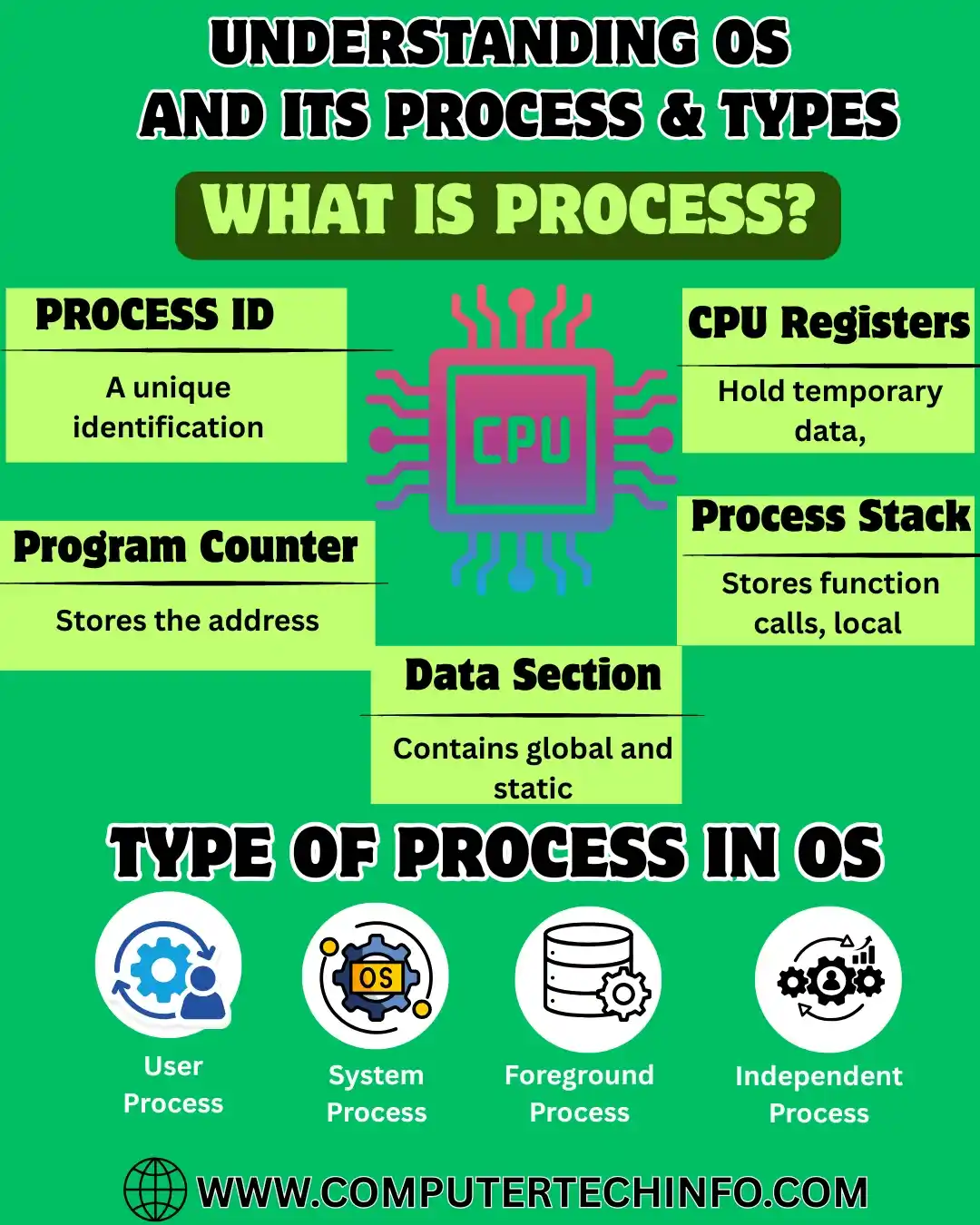
Today we will be discussing about the process has its own memory space, program counter, stack, and other resources that it needs to run. Here we are the components of a step-in operating system:
Also Read: Multiprocessor Operating System and its Examples, Types, Advantages, Feature!
Stack: Now we talk about stack is a region of memory using to store temporary data, such as function calls and local variables.
Heap: The heap is a region of memory for dynamic memory allocation.
Data Section: The data section is a region of memory to store global and static variables.
Text Section: This section contains the compiled program code, which read in from the non-volatile storage whenever the program launched.
Process Life Cycle
The process life cycle in an operating system refers to the different states. Ans this process goes through during its execution. The process life cycle has five main states:
Different Process States:
New: Let we talk this step, the process is being created, and its resources allocated by OS.
Ready: In this point, the process is waiting to assign to a processor. The process is ready to run, but it is waiting for the CPU to be available.
Running: We talk about; the step allows executing by the processor. The process is using the CPU to perform its task.
Waiting: In this point, the step is unable to run, but it is waiting for few external event or resource. Like input/output or a lock to release.
Terminated: In this step, the process completed its performance. The resources allocated to the process get free by the operating system.
Process vs Program
In operating system, a process is a compiled computer program that will execute by one or many threads. A program is a set of instructions or code that will compile and stored on disk, waiting to execute.
Also Read: Windows 11 and its Features, Benefits, Advantages and Disadvantages
The important difference between a process and program is that a program is a static entity, while a process is a dynamic entity. A program is a group of the instructions that install into memory and executed by the computer. A process, on the other hand, is an instance of a program that is running in memory.
Whenever a program will install into memory and to execute, it will become a process. The operating system creates a process to run the program, and the process will manage by the operating system. The operating system provides the process with the necessary resources such as memory, CPU time, and other resources required for its execution.
In short, a program is a static set of instructions that stores on disk, while a process is a dynamic entity that will create by the operating system when a program get load into memory and executed. The operating system manages the process and provides it with the necessary resources to execute the program’s instructions.
Different Types of Process
Processes are classified into different categories depending about how much time they consume while performing their I/O operations like as:
I/O Bound Processes:
Let we talk about in this point I/O bound processes spend most of their time waiting for input/output (I/O) operations to complete. You know process issues and I/O operation, it normally goes into a blocked or waiting state. Then, CPU can switch to another process that is ready to execute. The blocked process remains in this state until the I/O operation completes.
As we know I/O bound processes are common in systems that handle big amounts of data. This included file servers, database servers, and multimedia applications. These processes can benefit from using techniques like asynchronous I/O, multi-threading, and caching. It helps to improve performance and less the amount of time spent waiting like I/O operations to complete.
Also Read: Android Operating System and it Features, Advantages and Disadvantages
Operating systems normally use a variety of scheduling algorithms to manage I/O-bound processes. These algorithms aim to balance the needs of both CPU-bound and I/O bound processes to ensure that all processes are executed efficiently and fairly.
CPU Bound Processes:
Now we are talk about the CPU bound process is a type of process that needanimportant amount of CPU time to complete its execution. CPU-bound processes are generally characterized by long periods of computation without requiring much interaction with external I/O devices.
Examples of CPU-bound processes include scientific simulations, data processing, and mathematical computations. These processes typically perform a large number of calculations, iterations, or data manipulations, which consume most of the CPU’s time and resources.
As we know CPU-bound processes can be challenging to manage in an operating system, especially in a multitasking environment where various processes compete for CPU time at the same time. If the operating system does not manage the CPU resources efficiently, CPU bound processes can hog the CPU, making the system indifferent and create other operation to starve for CPU time.
Also Read: What is Operating System and its Types? Uses & Examples
Now we discussing about the handle of CPU bound processes, the operating system typically employs scheduling algorithms to prioritize CPU usage and allocate resources fairly among competing processes.
In addition, few operating systems use techniques like process pre-emption, time sharing, and dynamic priority adjustment to ensure that CPU-bound processes do not monopolize the CPU and affect the system’s overall performance.
Other Types of Processes:
There are several types of processes in an operating system, including:
User Processes: Now we talk this point are processes that are initiated and controlled by users, such as applications or programs that are run by users.
System Processes: In this point processes that are initiated and controlled by the operating system itself, such as device drivers, input/output (I/O) handlers, and system daemons.
Batch Processes: In this step processes that are submitted in groups or batches, and executed without user interaction, such as background tasks or jobs that are scheduled to run at a specific time.
Real Time Processes: Here we are discussing about processes that needinstant response from the operating system, like control systems or multimedia applications that need high speed processing.
Interacting Processes: Now we talk about processes that transfer and link with each other between inter process communication (IPC) mechanisms, like shared memory, pipes, or sockets.
Threaded Processes: Here we are discussing about the processes include of many threads of execution that share the same memory space like multithreaded applications; they can perform more tasks at the same time.
Let we are talk about thegeneral, the process scheduling algorithm decides which process to run next based on a set of criteria. The scheduling algorithm takes into account the priority of the process, the amount of CPU time already used by the process, the arrival time of the process, and other factors.
Closure
Today we have discussed in this article, process in operating systems with their terminology. As well as, different types of process in OS with ease.
Also Read: Windows Operating System and its Features, Advantages and Disadvantages
If this article is valuable for you, then please share it along with your friends, family members, pet lovers or relatives over social media platforms like as Facebook, Instagram, LinkedIn,X, and more.
Do you have any experience, tips, tricks, or query regarding on this? You can drop a comment!
Have a Nice Day!


