Hello Dears! Today we will explore all information about different types of Ethernet cable and the categories of Ethernet cable such as Cat 5, 5e, 6, 6a, 7 and 8 with ease. At the end of this article we will definitely understand Ethernet cable types with their categories without any obstacle.
Introduction to Ethernet Cable
This type of Ethernet cables allows devices to communicate or connect over the computer network. It can be your tablet computer, PC or other PlayStation. Ethernet cable also helps to provide a wired connection to your devices that links to the Internet.
In the market Ethernet cables are fairly available for a time so you do not have any possibility of data loss. Mostly Ethernet cables are going to support by all types of hardware. Now these days Ethernet cables come in sizes and different speeds.
What are the Different Types of Ethernet Cable?
In this section we will share types of Ethernet cable along with their connectors so you can choose the best one for your needs. Below each one is showing you can read them:
Coaxial Cable
These Coaxial cables are those cables that utilized for transmitting electrical signals. They consist of a metal conductor, an insulating dielectric material, a conducting shield and an outer jacket.
Types of Coaxial Cable:
Here are the types of coaxial cables including:
RG-6: This is a type of 75 Ohm coaxial cable commonly using for cable television, satellite TV and broadband internet networking.
RG-59: Another type of 75 Ohm coaxial cable RG-59 is often using for video surveillance systems and lower-frequency applications.
Read More: Coaxial Cable with Diagram | Types of Coaxial Cables & Their Uses
RG-58: This is a type of 50 Ohm cable commonly that used for Ethernet networking, radio frequency (RF) systems and telecommunications.
RG-8: Another type of 50 Ohm cable RG-8 uses for high-power transmission and professional audio and video applications.
Hardline: Hard-line coaxial cables are rigid and have a solid outer conductor. They are going to use for long-distance transmission and high-power applications.
Twin Axial: Twin axial coaxial cables have two conductors that uses for high-speed data transmission quickly across computer networks.
Triaxial: Triaxial coaxial cables have a layer of insulation. They have a layer of shielding. They provide protection against interference.
Semi-Rigid: Semi-rigid coaxial cables have an outer conductor but can be bent to a certain extent. They can be bent, to an extent and frequently utilized in microwave applications.
Line: Rigid line coaxial cables are highly durable and have a solid outer conductor. They are frequently using for power and high-frequency applications.
Types of Connectors are Used for Coaxial Cable:
These connectors meet needs in various applications roaming from telecommunications and broadcasting to wireless communication and electronics.
Read More: Applications and Uses of Fiber Optic Cables!
BNC Connector (Bayonet Neill-Concelman)
F-Type Connector
N-Type Connector
SMA Connector (SubMiniature version A)
TNC Connector (Threaded Neill-Concelman)
MCX Connector (Micro Coaxial)
MMCX Connector (Micro-Miniature Coaxial)
SMB Connector (SubMiniature version B)
UHF Connector (Ultra High Frequency)
Mini-UHF Connector
FME Connector (For Mobile Equipment)
Hardline: Hardline cables are rigid and have a solid outer conductor. They are intented for long-distance transmission and high-power applications.
Twin Axial: Twin axial coaxial cables is composed of two conductors and are used for high-speed data transmission, such as in computer networks.
Triaxial: Triaxial coaxial cables have a layer of insulation and shielding providing better protection against interference.
Semi-Rigid: Semi-rigid coaxial cables have an outer conductor but can be arched to a certain extent. They are frequently adopted in microwave applications.
Rigid Line: Rigid line coaxial cables are highly durable. Have a solid outer conductor. For your kind information these cables are mostly utilized for power and high-frequency applications.
Twisted Pair Cable
Twisted pair cables are mostly going to use for communications. They are made up of two copper wires twisted together in a shape.
Read More: Fiber Optic Cable with Diagram | Types of Fiber Optic Cable and Uses
This twisting helps make the wires work better together. It also reduces radiation and crosstalk between nearby wire pairs.
Types of Twisted Pair Cable:
Here are two types of pair cables:
Unshielded Twisted Pair (UTP): UTP cables consist of twisted pairs of copper wires without additional shielding. They are mostly using for Ethernet networks in homes, offices and data centers.
Shielded Twisted Pair (STP): STP cables have shielding, such as metallic foil or braided shielding around the twisted pairs.
This shielding provides protection against electromagnetic interference making STP suitable for industrial environments and areas, with higher interference levels.
Types of Connectors That Used for Twisted Pair Cable:
• RJ45 Connector (Registered Jack 45)
• RJ11 Connector (Registered Jack 11)
• RJ12 Connector (Registered Jack 12)
• RJ14 Connector (Registered Jack 14)
Fiber Optic Cable
Fiber optic cable is a kind of network cable that transmit data using light. It has a part called the core, which bears the light.
Read More: Advantages and Disadvantages of Coaxial Cable over Twisted Pair Cable
Around the core is a layer called cladding, which reflects the light back into the core to prevent signal loss.
Types of Fiber Optic Cable
There are two kinds of fiber optic cable: multimode and single mode. Here are some effective key differences between Multimode and Single Mode Fiber‑Optic Cable:
Multimode Fiber‑Optic Cable
- Multimode fiber optic cable can carry light rays (modes) at once because its core has different optical properties.
- Multimode fiber optic cable has a core size compared to single mode fiber optic cable. The core size for multimode fiber optic cable is between 50 and 62.5 microns.
- Multimode fiber optic cable uses a lower‑cost LED or VCSEL light source that works in the 850 nm window.
- Multimode fiber optic cable has a limited range because of dispersion; so it is usually using for building wiring when the distance is less than one kilometer.
Single Mode Fiber‑Optic Cable
- Single mode fiber optic cable uses a laser as its source.
- Single mode fiber optic cable has a much smaller core size (8–9 microns) than multimode fiber optic cable and uses only one path.
- Single mode fiber optic cable is great for long‑distance communication and it can transport signals up to 100 km.
- Single mode fiber optic cable identified by the label OS or Optical Single‑mode Fiber.
Types of Connectors for Fiber Optic Cable
- SC Connector (Subscriber Connector)
- LC Connector (Lucent Connector or Little Connector)
- ST Connector (Straight Tip)
- MTP/MPO Connector (Multi‑Fiber Push‑On/Pull‑Off)
- FC Connector (Ferrule Connector)
- MT‑RJ Connector (Mechanical Transfer Registered Jack)
- E2000 Connector
- DIN Connector
- MU Connector
Ethernet Cable Categories
We find it helpful to know that Ethernet cables are going to group by how they work and by their technical details. If you understand each type you can pick the one, for your equipment. The common categories of Ethernet cable are:
Cat‑1 (Category 1)
Cat‑1 Ethernet cable is the lowest grade of unshielded twisted‑pair (UTP) cable. And, Cat‑1 Ethernet cable made for analog voice only that used in old telephone systems. Cat‑1 Ethernet cable is not recognized by the EIA.
Cat‑2 (Category 2)
Cat‑2 Ethernet cable does not used much in networks. The Cat‑2 label is not a TIA/EIA standard. Ethernet cable categories normally start at Cat‑3.
Cat‑3 (Category 3)
Cat‑3 Ethernet cable introduced in the 1990s and was the first to support 10BaseT Ethernet and digital voice. And, Cat‑3 Ethernet cable has four pairs and works up to 16 MHz, which is too slow for today’s networking. Cat‑3 Ethernet cable can still be finding in buildings.
Cat‑4 (Category 4)
Cat‑4 Ethernet cable was mainly using for IBM Token Ring. Had a data rate of 16 Mbps. Cat‑4 Ethernet cable is now old and rarely used. Cat‑4 Ethernet cable remains in buildings where replacing all wires would be too expensive.
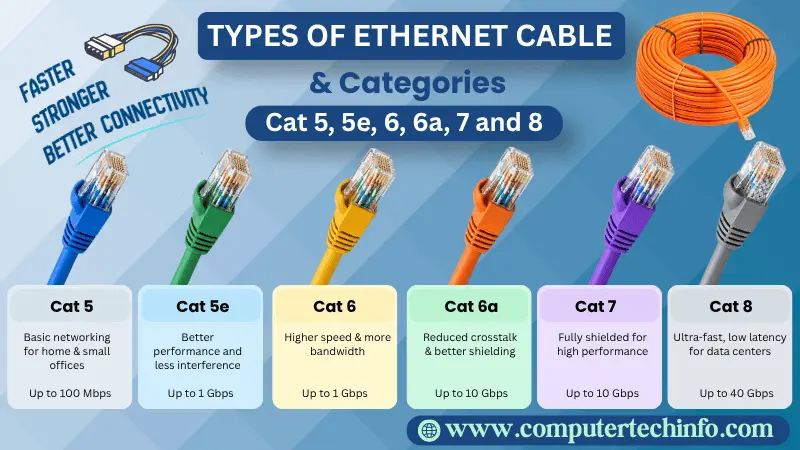
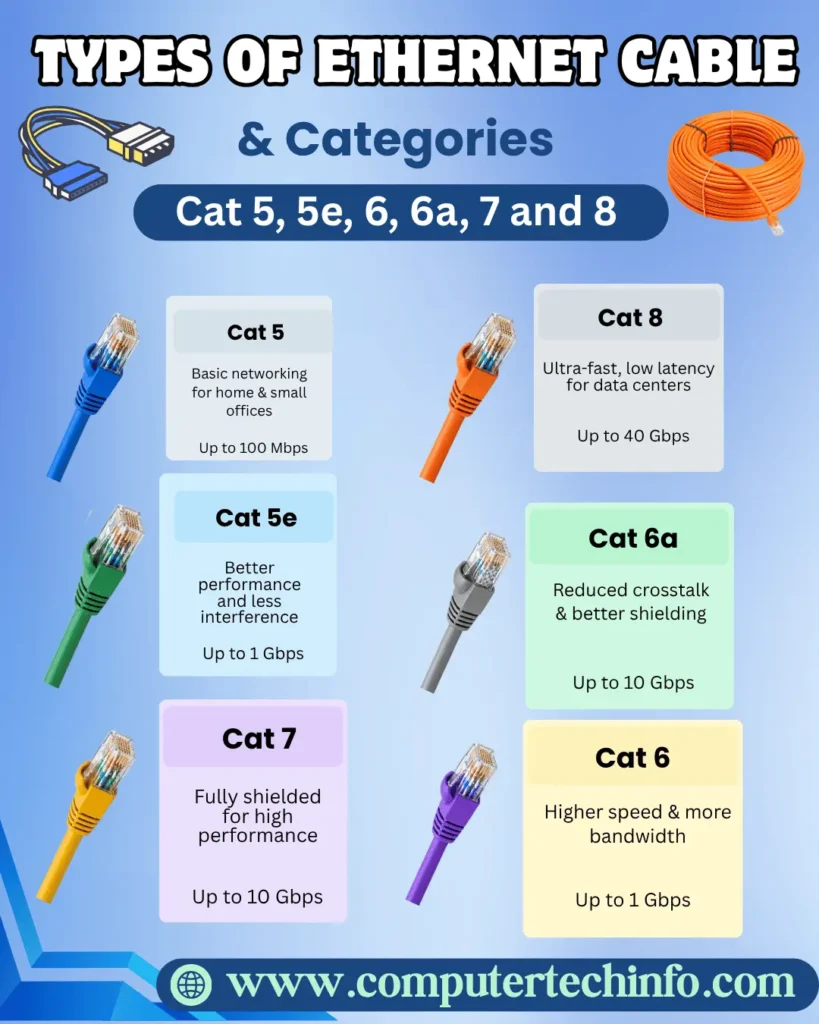
Cat‑5 (Category 5)
Cat‑5 Ethernet cable was common in the past. Can transfer up to 100 Mbps at 100 MHz. Cat‑5 Ethernet cable has largely been replaced by cables for faster speeds.
Cat‑5e (Category 5e)
Cat‑5e Ethernet cable is a version of Cat‑5, Ethernet cable can transfer up to 1 Gbps at 100 MHz, and Ethernet cable is still widely using for networking.
Cat‑6 (Category 6)
Cat‑6 Ethernet cable performs better than Cat‑5e. And, Cat‑6 Ethernet cable can transfer up to 10 Gbps at 250 MHz. Cat‑6 Ethernet cable uses where higher bandwidth and faster speeds are needed.
Cat‑6a (Category 6a)
Cat‑6a Ethernet cable is an upgraded version of Cat‑6. And, Cat‑6a Ethernet cable can transfer up to 10 Gbps at 500 MHz. Cat‑6a Ethernet cable is suitable, for applications that need bandwidth and less interference.
Cat‑7 (Category 7)
Cat 7 cables build for performance that commonly used in professional networking settings. They can move data at speeds up to ten gigabits, per second with a frequency of six hundred megahertz. Cat 7 cables also usually have shielding that helps cut interference.
Cat-8 (Category 8)
Cat 8 cables are created for data centres and enterprise setups that need high‑performance networking. They can move data at speeds of twenty‑five or forty gigabits per second with a frequency of two thousand megahertz. Cat 8 cables are often going to use for fast links that are short in length.
Ethernet Cable Performance
The farthest distance listed in the table is a general idea. This distance can be different depending on how good the cable’s what the surroundings are, like. You should choose the right Ethernet cable is very important to pick its type according to the speed, distance, and performance your network needs.
Read More: What is Difference Between Switch and Hub? Switch Vs. Hub in Networking
- Category Max. Data Rate Bandwidth Max. Distance Usage
- Cat 1 1Mbps 0.4MHz Short Telephone and modem lines
- Cat 2 4Mbps 4MHz Short-distance, local communication & telephone
- Cat 3 10Mbps 16MHz 100 m 10BaseT Ethernet
- Cat 4 16 Mbps 20MHz 100 m Token Ring
- Cat 5 100 Mbps 100MHz 100 m 100BaseT Ethernet
- Cat 5e 1Gbps 100MHz 100 m 100BaseT Ethernet, residential homes
- Cat 6 1Gbps 250MHz 100 m Gigabit Ethernet, commercial buildings
- Cat 6a 10Gbps 500 MHz 100m Gigabit Ethernet in data centers
- Cat 7 10Gbps 600 MHz 100m High-performance networks, data centers
- Cat 7a 40Gbps 1000 MHz 100m High-performance networks data centers
- Cat 8 25Gbps or 40Gbps 2000MHz 30m- High-performance networks data centers
Ethernet Cable Connectors
Ethernet cable connectors are key to building network links. There are types of Ethernet cable connectors, including:
RJ45 Connector: This is the connector for Ethernet cables. These connectors has eight pins that can connect the cable to the device on computers, routers, switches and other networked devices.
RJ11 Connector: RJ45 connector is smaller than an RJ45 as it has four or six pins. Does not work for Ethernet networking. It is frequently utilizing for telephone lines.
TIA-568A and TIA-568B: These are two standard rules for that tell us in which order the wires of a LAN/Ethernet cable should be placing in an RJ45 connector, so the internet/data signals can travel properly.
Read More: Network Operating System (NOS): Examples, Types and Components!
Modular Plug Terminators: These are using to attach connectors to the end of Ethernet cables. Modular plugs come in categories, such as Cat 5e, Cat 6 and so on so they match the cable type.
Ethernet Couplers: If an Ethernet cable is too short, these connectors help join two cables together to make one longer cable. They are useful for making links without losing signal quality.
Ethernet Adapters: These connectors let you change one type of Ethernet connector into another such as turning an RJ45 into a USB or HDMI connection for particular devices.
Final Thoughts
Now we hope you feel fully informed, about the kinds of Ethernet cables and the categories Cat 5, 5e, 6, 6a, 7 and 8 so you can choose the right one for your needs.
If this article is valuable for you, then please share it along with your friends, family members, pet lovers or relatives over social media platforms like as Facebook, Instagram, LinkedIn,X, and more.
Do you have any experience, tips, tricks, or query regarding on this? You can drop a comment!
Have a Nice Day!